Microsoft Windows 7 Home Premium 64BIT Operating System Software  OEM DVD Logo
M
Melva Mejia Posted on Nov 22, 2015

How i install javascript - Microsoft Windows 7 Home Premium 64BIT Operating System Software OEM DVD

1 Answer

George Deepak

Level 1:

An expert who has achieved level 1.

New Friend:

An expert that has 1 follower.

Corporal:

An expert that has over 10 points.

Mayor:

An expert whose answer got voted for 2 times.

  • Contributor 18 Answers
  • Posted on Nov 23, 2015
George Deepak
Contributor
Level 1:

An expert who has achieved level 1.

New Friend:

An expert that has 1 follower.

Corporal:

An expert that has over 10 points.

Mayor:

An expert whose answer got voted for 2 times.

Joined: Mar 01, 2011
Answers
18
Questions
0
Helped
1766
Points
58

JavaScript is a browser-based scripting language used by millions of websites. It allows programmers to create Web pages capable of delivering dynamic functionality and in-page refreshing that can be interpreted by any modern browser. Because JavaScript has often been used to deploy pop-ups and other distracting page elements, some users opt to disable the technology. Fortunately, whether you use Internet Explorer, Firefox, Opera or Safari on your Windows 7 computer, you can re-enable JavaScript with only a few clicks.

Read more : http://www.ehow.com/how_8132036_enable-javascript-windows-7.html

Add Your Answer

×

Uploading: 0%

my-video-file.mp4

Complete. Click "Add" to insert your video. Add

×

Loading...
Loading...

Related Questions:

0helpful
1answer

How can i enable javascript on my samsung e250

javascript is already enabled on samsung e250.
just copy the java app on memory card which u want to install.
Thank You
0helpful
1answer

I need instructions on how to dowload videos from youtube using google chrome browser and vbox7 downloader

firstly u should open ur account on u tube,
then you can try following Bookmarklet (Javascript plugins), it will instantly get the video URL from the webpage even if it's not yet finished loading. No Website or software is needed. It's a bookmarklet(a bookmark containing JavaScript) in practice, you can also use it in FireFox, Safari or Inetnet Explorer.

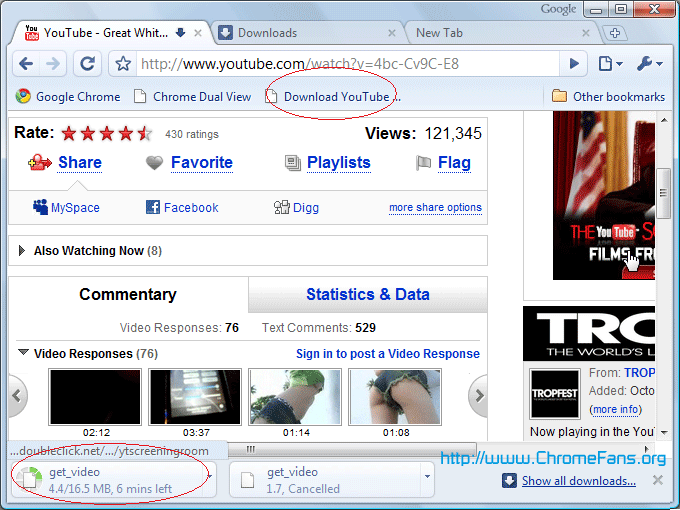
span-download-youtube-video.png Install Google Chrome Plug-in: Download YouTube Video/Movie in Google Chrome Install this Javascript Plug-in is very easy, please do following steps:

  1. Make sure your Google Chrome browser always shows the Bookmarks bar. You can click menu Tools -> Always show bookmarks bar, the hotkey is Ctrl + B.
  2. Right click on the bookmarks bar, and then select Add Page.
  3. download-youtube-video-1.png

  4. In the Name field, enter "Download YouTube Video" or something you will remember, then for the URL field paste:
  5. javascript:window.location.href = 'http://youtube.com/get_video?video_id=' + swfArgs['video_id']+ "&l=" + swfArgs['l'] + "&sk=" + swfArgs['sk'] + '&fmt_map' + swfArgs['fmt_map'] + '&t=' + swfArgs['t'];Update: Nov 23, 2009: YouTube has modified the video parameters, the code above can't work now, use this:
    javascript:window.location.href = 'http://youtube.com/get_video?video_id=' + yt.getConfig("SWF_ARGS")['video_id'] + "&sk=" + yt.getConfig("SWF_ARGS")['sk'] + '&t=' + yt.getConfig("SWF_ARGS")['t'];

    download-youtube-video-2.png

  6. Click OK button.
How to use Plug-in to download YouTube Video in Google Chrome Now, the Javascript plugin is installed in your Google Chrome. Go to the YouTube video you want to download, when it starts playing click your "Download YouTube Video" bookmark and you will see the .flv file start to download in Google Chrome's download status bar.

download-youtube-video-3.png

Feb 26, 2011 • Home
0helpful
2answers

I need help on how to install my javascript

Hello charming, go to "Website," you'll be able to "Download JavaScript"

If this information helped? Return and give a "Helpful Rating," please!
Thanks, paul7of9
Click here: http://www.java.com/en/download/index.jsp

0helpful
1answer

Trying to view slide show in Flickr. Says I need

All web browsers in WIndows XP will usually have JavaScript enabled by default, but on occasion, it will be turned off. By turning JavaScript on in your web browser, you will have access to more interactive content when you visit certain websites. For Windows XP users, JavaScript can be enabled in both the Internet Explorer and Firefox web browsers. Open the Internet Explorer Click on "Tools" in the top menu bar and choose "Internet Options."
Go to the "Security" tab at the top of the window and click on the "Custom Level" button. croll down to the "Scripting" category and click on the "Enable" option next to "Active Scripting." JavaScript is now enabled.
  • Step 4 Scroll down to the "Scripting" category and click on the "Enable" option next to "Active Scripting." JavaScript is now enabled.

  • Read more: How to Turn on Javascript in Windows XP | eHow.com http://www.ehow.com/how_4812316_turn-javascript-windows-xp.html#ixzz0ssJIX0wR
    1helpful
    2answers

    I need to install javascript

    Javascript is used in the form of client-side scripting implementated as a part of webbrowser. No need to install any specific software. You just have to enable certain settings in internet explorer for it to work properly

    Follow the link for more information

    http://www.ehow.com/how_4886248_install-java-script-internet-explorer.html

    Hope this helps
    0helpful
    1answer

    I can't see video in you tube, i try to install flash player, but it's can't.. help me please,, thanks..

    If you're receiving this error message and unable to play videos,
    here's what I recommend to get you back on track and able to watch
    videos successfully again. Please follow the steps listed below...

    1. Uninstall the version of Adobe Flash that you currently have
    running on your computer. You can uninstall Flash here:
    http://kb.adobe.com/selfservice/viewContent.do?externalId=tn_14157

    2. Once you've uninstalled Flash, then go to the Adobe site and
    download the most recent version of the Flash player:
    http://get.adobe.com/flashplayer/

    3. At this point, completely exit your browser (don't just close the
    window, exit the browser completely).

    4. Only now, once you've exited your browser, can you install the new
    version of the Flash player you just downloaded. Install the Flash
    player.

    5. Finally, open your browser again. Go to YouTube and try playing a
    video-- the video should now play!

    6. If the video *still* doesn't play, make sure you have JavaScript
    enabled (turned on) in your browser.

    If you're not sure how to do this, do a Google search for your browser
    and then "enable JavaScript". You should easily find instructions on
    how to enable Javascript.

    Here are a couple of examples for Firefox, Internet Explorer, and
    Opera users:

    http://www.ehow.com/how_2033406_enable-javascript-firefox.html
    and
    http://www.tranexp.com/win/JavaScript-enabling.htm

    We really hope these tips help! Good luck & enjoy
    Apr 30, 2010 • Yahoo Mail
    0helpful
    2answers

    Youtube isnt working

    Delete your temporary internet files and cookies. You can find those options under internet options...
    5helpful
    1answer

    Nokia 6300 - enable javascript

    these version phones are javascript enabled and so thats not the problem with phone. are you in india? In india, due to low connectivity of the internet, it comes connection failed. i too have the same problem with my windows mobile.
    0helpful
    2answers

    It says turn on javascript or update flash player

    go to http://get.adobe.com/flashplayer/ and download flash player.
    When u install it....close your browser and open it again....it shoud work now....
    1helpful
    2answers

    Javascript functioning

    First open Internet Explorer.

    Press [Alt] + [T] + [O] to go to Internet Options.

    Choose the Advanced tab and then click the [Reset] button showing under the Reset Internet Explorer Settings section showing in the bottom half of the menu screen.

    Close Internet Explorer.

    Run Regedit.exe

    Go to the following registry entry:

    HKEY_CURRENT_USER\Software\Microsoft\Windows\CurrentVersion\Ext

    Reset all DWORD entries value to 0.

    Re-start Internet Explorer.

    Java Runtime Environment (if it is indeed installed on the computer; else install JRE 1.4.2_08) should be enabled now and you should be able to view your javascript tutorials.
    Not finding what you are looking for?

    128 views

    Ask a Question

    Usually answered in minutes!

    Top Microsoft Computers & Internet Experts

    Sudeep Chatterjee
    Sudeep Chatterjee

    Level 3 Expert

    3269 Answers

    Grand Canyon Tech
    Grand Canyon Tech

    Level 3 Expert

    3869 Answers

    Brad Brown

    Level 3 Expert

    19190 Answers

    Are you a Microsoft Computer and Internet Expert? Answer questions, earn points and help others

    Answer questions

    Manuals & User Guides

    Loading...